Sony BRAVIA 7 II XR70M2 65-inch wall mount: VESA 300 × 300 mm, 58.6 lb
The Sony XR70M2 65-inch (K-65XR70M2) uses a VESA 300 × 300 mm pattern and weighs 58.6 lb without its stand. Any mount that lists 300 × 300 mm, is rated above 58.6 lb and covers 65-inch screens fits it.
| VESA pattern | 300 × 300 mm (11.81 × 11.81 in) |
|---|---|
| Weight without stand | 58.6 lb (67.7 lb with stand) |
| US model number | K-65XR70M2, K-65XR70SM2 |
| Model year | 2026, True RGB LED LCD |
VESA and weight from Sony's product page, checked Sep 22, 2026. Measure your own TV's holes if the model number on its sticker differs.
Mounts that fit the XR70M2 65"
Each one lists 300 × 300 mm, a rating above 58.6 lb and 65-inch screens on its own spec sheet.

Checked against the size, weight and pattern above
Mounting Dream Fixed TV Wall Mount Low Profile TV Bracket for 42-90 Inch TV
For the XR70M2 65"
Flush fixed plate that spans up to 32-inch stud spacing, useful when your studs are not where you want the TV.
- Fits 42 to 90" screens
- Rated to 132 lb, your panel is about 59 lb
- Supports VESA up to 800 × 400 mm
$49.99
See it on Amazon
Lowest current price of the mounts that fit
USX MOUNT Tilting TV Wall Mount for Most 37"-95" Flat Curved Screen Television
For the XR70M2 65"
Covers almost every mainstream TV up to 95 inches and stays low-profile against the wall.
- Fits 37 to 95" screens
- Rated to 132 lb, your panel is about 59 lb
- Supports VESA up to 600 × 400 mm
$20.99
See it on AmazonPrices as of Nov 4, 2026, 11:55 AM EST. Product prices and availability are accurate as of the date/time indicated and are subject to change. Any price and availability information displayed on Amazon.com at the time of purchase will apply to the purchase of this product. As an Amazon Associate, Express Mounting earns from qualifying purchases.
If it needs to tilt or swivel
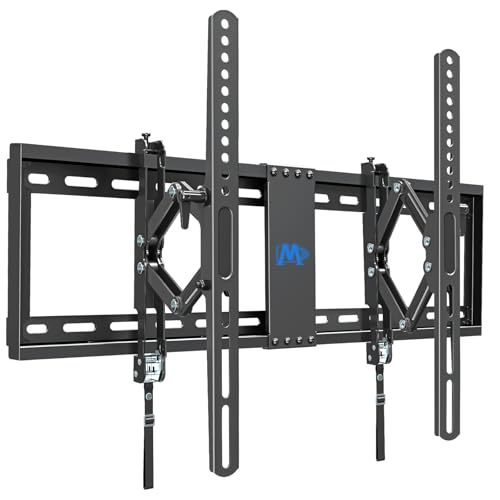
Angles the screen down when it hangs above eye level
Mounting Dream UL Listed Advanced Tilt TV Wall Mount for Most 42-90 Inch TV
Listed for 300 × 300 mm and 58.6 lb
Advanced tilt: pulls 7 inches off the wall before it angles down, so you can reach the ports and get a real viewing angle from a high or above-fireplace position.
- Fits 42 to 90" screens
- Rated to 120 lb, your panel is about 59 lb
- Supports VESA up to 600 × 400 mm
$50.49
See it on Amazon
Pulls out and turns for corners and open rooms
Perlegear UL Listed Full Motion TV Wall Mount for 42-90" TVs up to 132lbs
Listed for 300 × 300 mm and 58.6 lb
Dual arms, tool-free tilt and swivel, UL-listed to 132 lb, the value pick we actually carry.
- Fits 42 to 90" screens
- Rated to 132 lb, your panel is about 59 lb
- Supports VESA up to 600 × 400 mm
$49.99
See it on AmazonThe XR70M2 65-inch against its lineup
Sony lists the 2026 XR70M2 (True RGB LED LCD) in 50, 55, 65, 75, 85 and 98 inches. 11 of the 12 Sony 65-inch models from 2024 to 2026 in this research use 300 × 300 mm; the others use 400 × 200 (1). 2 of them weigh more than this one. 58.6 lb is about 25% over the 47 lb typical of 65-inch panels, so read the weight rating before the size range.
The 2026 Sony XR90M2 65-inch (K-65XR90M2) lists the same 300 × 300 mm pattern and 58.6 lb, so the mounts matched here fit it on paper. Sony lists no other mounting difference between the two; they are separate models in its lineup. XR90M2 65-inch mount page →
What changed from the 2024 Sony XR70
- Pattern: 300 × 300 mm on both, so a bracket bought for the XR70 lines up.
- Weight: 59.7 lb then, 58.6 lb now (1.1 lb lighter).
- A mount rated for the XR70 carries this one too.
How often mount patterns change between model years →
Screws, studs and height
The holes are only 11.8 in apart side to side, less than the 16 in between studs. The mount's wall plate has to reach two studs on its own, so check its width, not just its VESA range.
With the center at 42 in for sofa seating, a 65-inch screen runs from about 26 in to 58 in off the floor. In a bedroom the center goes 42 to 50 in. The height calculator works it out for your own seat.
Hiding the cables behind the XR70M2 65"? The wire hiding kit builder lists the parts for your wall, and the soundbar mount finder picks a bracket for a bar under it.
Other sizes of the XR70M2
The XR70M2 changes pattern with size: 50" 200 × 200, 55" 300 × 300, 65" 300 × 300, 75" 300 × 300, 85" 400 × 400, 98" 600 × 400. Buy for the size you own.
| Size | VESA | Weight without stand |
|---|---|---|
| 50" | 200 × 200 mm | 34.6 lb (K-50XR70M2) |
| 55" | 300 × 300 mm | 40.6 lb (K-55XR70M2) |
| 75" | 300 × 300 mm | 80.7 lb (K-75XR70M2) |
| 85" | 400 × 400 mm | 101.2 lb (K-85XR70M2) |
| 98" | 600 × 400 mm | 137.1 lb (K-98XR70M2) |
Other TVs on 300 × 300 mm
- Sony XR90M2 65", 58.6 lb
- Sony XR70 65", 59.7 lb
- Sony XR50 65", 54.9 lb
- LG G4 65", 52.5 lb
- Sony XR80M2 65", 50.5 lb
- LG QNED85A 65", 49.6 lb
Every TV with a 300 × 300 pattern →
Frequently asked questions
What VESA pattern does the XR70M2 65" use?
VESA 300 × 300 mm: 300 mm between the holes side to side and 300 mm top to bottom (11.81 × 11.81 in). That is from Sony's product page, checked Sep 22, 2026.
How much does the XR70M2 65" weigh?
58.6 lb without the stand and 67.7 lb with it. Bracket ratings are for the panel alone, so 58.6 lb is the number to shop against.
Will a mount from the 2024 XR70 65" fit?
The pattern is the same (300 × 300 mm), so it bolts on. The weight is 58.6 lb against 59.7 lb, so the rating carries over.
Can the XR70M2 65" hang on drywall without studs?
No. Drywall alone is for TVs up to about 32 in and 30 lb on rated toggle anchors. At 65 in and 58.6 lb it needs the bolts in studs, or masonry anchors in brick or concrete.
Want the XR70M2 mounted for you?
Mounting a 65-inch TV is $159 flat in all 15 metros we serve. The bracket is separate: bring your own, or add a flat mount for $69 or a full-motion mount for $79. Every install carries our 3-year workmanship warranty.
Get a free estimate →More Sony models: all Sony TVs by model · look up another TV