Soundbar and floating shelf installation under a wall-mounted TV requires three coordinated specs: shelf width 2 inches wider than the soundbar (3-4 inches narrower than the TV), shelf depth 6-8 inches for a typical Sonos/Samsung/Bose bar, and shelf-anchor capacity rated for at least 40 lbs (soundbar plus the cable adapter clutter). Across 9,747+ installs since 2015, the most overlooked variable is the cable management between TV, soundbar and console.
Quick note: This page contains Amazon affiliate links. We may earn a small commission at no extra cost to you if you buy through them. Our picks are the hardware our crews install on real customer walls, not spec-sheet guesses.
A wall-mounted TV is only part of the equation. What about sound? What about your streaming devices, gaming consoles, and cable boxes? Where do all those components go when there’s no entertainment center beneath your floating screen?
The answer lies in smart integration: professionally mounted soundbars that deliver immersive audio and floating shelves that house your components while maintaining that clean, modern aesthetic.
At Express Mounting, we help Atlanta homeowners complete their entertainment walls with integrated soundbar mounting, floating shelf installation, and professional cable management-turning a wall-mounted TV into a true home theater experience.
Why a Wall-Mounted TV Needs Sound and Shelf Planning
The Sound Problem
Modern flat-panel TVs sacrifice audio quality for slim profiles:
- Speakers fire backward or downward
- Thin enclosures can’t produce bass
- Audio quality is an afterthought in TV design
- Dialogue becomes hard to hear
- Movies lose their cinematic impact
The solution: A quality soundbar mounted properly below your TV delivers:
- Front-firing speakers aimed at viewers
- Dedicated subwoofers for bass response
- Dolby Atmos and surround sound options
- Clear dialogue and rich audio
The Component Problem
Where do you put devices when the TV is on the wall?
Common struggles:
- Cable box, streaming devices, and gaming consoles need a home
- Floor-standing entertainment centers defeat the floating TV aesthetic
- Devices on the floor look messy and attract dust
- Long cable runs from distant components create concealment challenges
The solution: Floating shelves mounted below or beside the TV:
- Maintain the clean wall-mounted aesthetic
- Keep components accessible
- Minimize cable run distances
- Create intentional, designed appearance
Soundbar Mounting Options
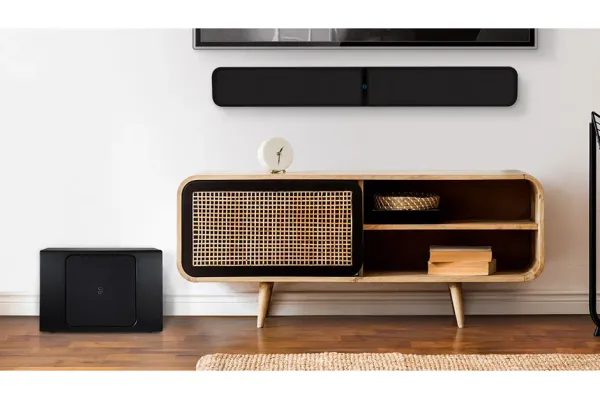
Option 1: Direct Wall Mount Below TV
What it is: Soundbar mounted directly to the wall, positioned below the TV
Best for:
- Most soundbar types and sizes
- Clean, integrated appearance
- Any TV mounting style (fixed, tilt, or full-motion)
Considerations:
- Requires separate mounting hardware (often included with soundbar)
- Soundbar remains stationary when TV moves (full-motion mounts)
- Cable routing needed for power and connections
Option 2: Attached to TV Mount
What it is: Soundbar attaches to the TV mounting bracket, moves with the TV
Best for:
- Full-motion TV mounts
- Maintaining optimal audio positioning
- Situations where TV frequently moves
Considerations:
- Requires compatible soundbar bracket adapter
- Adds weight to TV mount (verify capacity)
- Some soundbars too large or heavy for this approach
Option 3: Shelf-Mounted Soundbar
What it is: Soundbar placed on a floating shelf below the TV
Best for:
- Larger soundbars that are difficult to wall-mount
- Soundbars with upward-firing Atmos speakers
- Easy access for future upgrades
Considerations:
- Shelf must be deep enough for soundbar
- Creates slightly less clean appearance than wall mounting
- Soundbar can be repositioned easily
Option 4: Dedicated Soundbar Shelf
What it is: Thin floating shelf designed specifically for soundbar placement
Best for:
- Soundbars that work best in specific positions
- When wall mounting isn’t possible
- Achieving precise height positioning
Considerations:
- Additional shelf mounting required
- Shelf visible beneath soundbar
- May interfere with some TV tilt positions
Soundbar Positioning Best Practices
Optimal Distance Below TV
The soundbar should be positioned:
- 2-4 inches below TV bottom edge for visual integration
- At or slightly below ear level when seated (ideal audio)
- Not blocking TV infrared sensor (if applicable)
- Centered with TV for balanced audio staging
Clearance Considerations
If your TV tilts:
- Ensure soundbar doesn’t block TV at maximum tilt
- Calculate clearance with TV tilted fully forward
If your TV extends on full-motion mount:
- Decide if soundbar should move with TV or remain stationary
- Wall-mounted soundbar may point away from viewing position when TV is extended
For soundbars with upward-firing speakers:
- Maintain clearance above soundbar for Atmos drivers
- Shelf mounting may be better than close wall mounting
Popular Soundbar Mounting Scenarios
Samsung Soundbar with Samsung TV
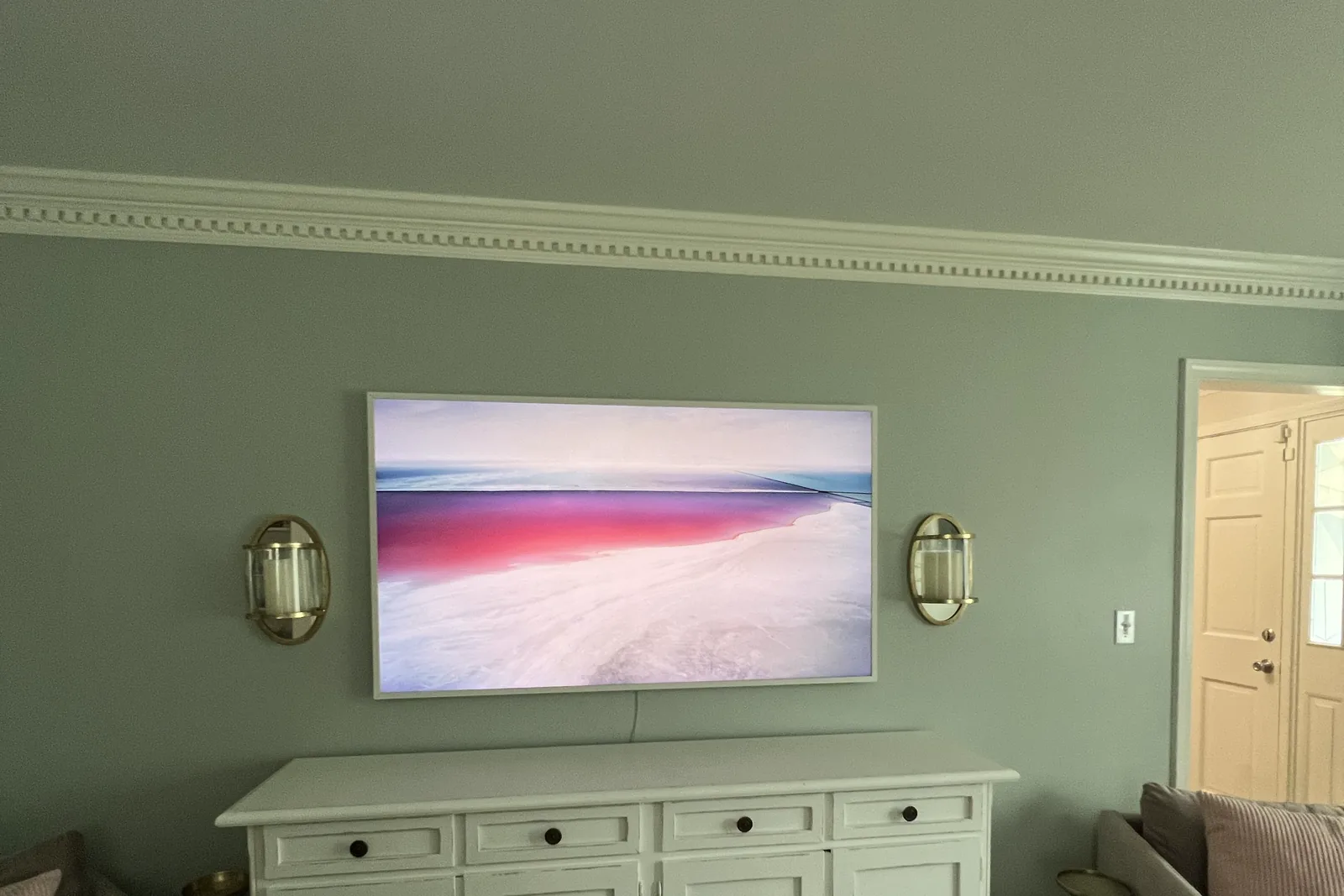
A Samsung bar like the Samsung HW-Q990D syncs with a Samsung TV through Q-Symphony, so the TV’s own speakers join in. Over a fireplace, set the bar low enough to stay out of the mantel’s heat. If you’re working with a Samsung Frame TV, see our dedicated Frame TV installation service page for art-mode-friendly soundbar pairing.
Samsung offers Q-Symphony technology that synchronizes TV and soundbar speakers:
Mounting recommendation:
- Wall mount directly below TV
- Use Samsung’s included mounting hardware
- Position for optimal Q-Symphony performance
- Consider Samsung’s wireless subwoofer placement
Sonos Arc/Beam with Wall-Mounted TV
Sonos soundbars are popular choices for their sound quality and smart home integration. A common pairing is a Sonos Arc above a deep floating shelf that holds an Apple TV and a console. The Arc’s upward-firing Atmos drivers need open space above them, so don’t tuck it tight under the TV bezel.
For a shelf setup, run the HDMI inside the wall with a CL3-rated cable down to the shelf, and update the TV’s firmware before you blame the bar: an eARC handshake problem is a common reason Dolby Atmos won’t pass through to the soundbar.
Mounting recommendation:
- Use Sonos-specific wall mount bracket (verify VESA pattern compatibility on your TV)
- Position 2-3 inches below TV
- Maintain clearance for Dolby Atmos (Arc)
- Plan for Ethernet or WiFi connectivity
Bose Soundbar Systems
Bose soundbars deliver premium audio with specific mounting requirements:
Mounting recommendation:
- Use Bose’s proprietary mounting accessories
- Follow Bose-recommended spacing guidelines
- Consider Bose’s module placement (subwoofer, surrounds)
- Integrate with Bose app for calibration
Budget-Friendly Soundbars
Affordable soundbars from Vizio, TCL, and similar brands:
Mounting recommendation:
- Wall mount or shelf mount based on included hardware
- Position centered below TV
- Consider soundbar’s IR repeater needs (if applicable)
- Plan cable routing for typically shorter cables
Floating Shelf Installation
Why Floating Shelves Work
Floating shelves create the illusion of “floating” with no visible brackets:
Benefits:
- Clean, modern aesthetic matching wall-mounted TVs
- No bulky entertainment center
- Customizable positioning
- Multiple shelves for multiple components
Floating Shelf Types
Standard floating shelves:
- Solid surface with concealed bracket
- Various materials (wood, MDF, metal, glass)
- Depths typically 8-12 inches
- Widths from 24 to 60+ inches
Media-specific floating shelves:
- Designed for AV equipment
- Built-in cable management
- Ventilation slots or open backs
- Pre-drilled for cable routing
Floating media consoles:
- Larger units with storage
- Cabinet doors for concealment
- Multiple shelf levels
- Drawer options available
Floating Shelf Sizing for Media Equipment
| Component | Minimum Shelf Depth | Minimum Shelf Width | Notes |
|---|---|---|---|
| Cable box | 8” | 12” | Ventilation important |
| Streaming device | 6” | 8” | Small footprint |
| Gaming console | 10” | 16” | Heat generation concern |
| Blu-ray player | 10” | 14” | Standard AV component size |
| AVR/receiver | 14” | 18” | Significant heat output |
| Multiple devices | 12” | 36-48” | Allow spacing between |
Floating Shelf Installation Requirements
Weight capacity considerations:
- Each shelf should support 3-4x the expected load
- Add equipment weight + future additions
- Account for any decorative items
- Quality brackets rated for 50-150+ lbs
Wall structure requirements:
- Must mount to studs for significant loads
- Single-stud mounting limits weight capacity
- Two-stud mounting ideal for larger shelves
- Toggle bolts only for light loads
Spacing and positioning:
- Below TV: Allow enough gap for cable access
- Between shelves: Minimum 12” for components
- From floor: Consider seating sightlines
- Depth from wall: Account for cable bend radius
Cable Management for Integrated Systems
The Challenge
Adding soundbar and shelves means more cables to hide:
Typical cable count:
- TV power cable
- TV HDMI (from shelf components)
- Soundbar power cable
- Soundbar optical or HDMI
- Cable box/streaming device HDMI
- Cable box power
- Gaming console HDMI and power
- Possible network cables
Cable Management Solutions
In-wall cable routing:
- Cleanest solution (see our in-wall power kit guide)
- Requires drywall cutting
- Must use proper in-wall rated cables for power
- Creates completely hidden runs
Cable raceway systems:
- Surface-mounted channels (full walkthrough in our raceway guide)
- Paintable to match wall
- No drywall cutting
- Can run vertical and horizontal
Behind-component routing:
- Cables hidden behind floating shelves
- Uses shelf depth to conceal
- Requires open-back or cable-access shelves
- Combined with vertical raceway drops
Power bridge systems:
- Relocate power to behind TV/shelf area
- Eliminate need for power cables across wall
- Code-compliant in-wall power
- Professional installation recommended
Our Soundbar & Floating Shelf Services
Soundbar mounting: $79
- Soundbar wall mounting, level and centered below the TV
- Connection to the TV and basic cable management
- Uses the bracket that came with your soundbar; for non-standard bars we recommend a universal soundbar wall mount bracket
- The same $79 whether the TV goes up on the same visit or is already on the wall
Floating shelves: quoted when you book
- Mounted into wall studs, level, with the cable routing planned
- You supply the shelf; the price depends on its size and the wall, so we quote it before we start
Putting it together
A 65-inch TV with a soundbar under it and the wires hidden in the wall comes to $159 + $79 + $99 = $337, plus the shelf. The full list is below.
Canonical Express Mounting install pricing
Basic mount $129 (up to 54”). $159 (55-69”). $209 (70-79”). $299 (80-99”), $399 (100”+). Cable concealment +$99/TV. Masonry surcharge +$99. Soundbar mounting +$79. The bracket isn’t included: bring your own, or add ours (flat $49/$69, full-motion $59/$79). Call (470) 777-4077.
Design Considerations for Entertainment Walls
Visual Balance
Creating an aesthetically pleasing entertainment wall:
Centering:
- TV should be the focal point
- Soundbar centered below TV
- Shelves centered or symmetrically placed
Proportions:
- Soundbar width typically 50-100% of TV width
- Shelves should complement, not overwhelm TV
- Consider visual weight distribution
Spacing:
- Consistent gaps between elements
- Breathing room around TV
- Not overcrowded with shelves
Minimalist vs. Functional
Minimalist approach:
- Single floating shelf for essential components
- Hidden storage elsewhere for extra devices
- Emphasis on clean lines
Functional approach:
- Multiple shelves for all components
- Easy access prioritized
- More visual complexity accepted
Material Coordination
Match or complement your space:
- Wood shelves for warm, traditional feel
- White/black shelves for modern aesthetics
- Glass shelves for visual lightness
- Metal shelves for industrial style
Component Heat Management
Why Heat Matters
Electronics generate heat that can:
- Reduce component lifespan
- Cause performance issues
- Create fire hazards in enclosed spaces
- Lead to premature failure
Heat Management Strategies
Shelf selection:
- Open-back shelves for airflow
- Avoid fully enclosed cabinets
- Mesh or slatted shelf surfaces
Component spacing:
- Minimum 2-3 inches between devices
- Don’t stack components directly
- Leave clearance above hot components
Additional cooling:
- USB-powered cooling fans
- Ventilated shelf inserts
- AC Infinity component coolers
Device placement:
- Hottest components on top shelves
- Cable boxes and gaming consoles need most ventilation
- Streaming devices generate minimal heat
Frequently Asked Questions
Should the soundbar be wall-mounted or placed on a shelf?
Wall mounting creates a cleaner look and is recommended when possible. Shelf placement works well for larger soundbars, soundbars with upward-firing speakers (Atmos), or when wall mounting isn’t feasible.
How far below the TV should the soundbar be?
Typically 2-4 inches below the TV’s bottom edge. This creates visual integration while maintaining proper audio positioning. Adjust based on soundbar height and TV tilt requirements.
Can floating shelves hold heavy gaming consoles?
Yes, when properly installed. PS5, Xbox Series X, and similar consoles weigh 8-10 lbs. Quality floating shelves rated for 50+ lbs easily handle this-the key is proper stud mounting.
Will the soundbar interfere with my TV’s IR sensor?
Potentially. If your TV uses infrared remote control, positioning a soundbar directly in front of the IR sensor can block signals. Most modern soundbars include IR repeaters that forward signals to the TV.
How do you hide cables when adding a soundbar and shelf?
Options include:
- In-wall cable routing (cleanest)
- Surface-mounted raceways (easiest)
- Routing behind floating shelves
- Combination approaches based on layout
Can you add soundbar and shelves to an existing TV installation?
Yes. We frequently add audio and shelving to previously mounted TVs. The process may require additional cable management depending on the original installation.
Do I need an electrician for floating shelf installation?
Typically no. However, if you want outlets relocated behind shelves or in-wall power for the entertainment area, electrical work may be needed. We can coordinate with licensed electricians for these additions.
Service Areas
We provide soundbar and floating shelf installation throughout Metro Atlanta:
North Atlanta: Alpharetta, Roswell, Johns Creek, Milton, Cumming, Dunwoody
Central Atlanta: Buckhead, Midtown, Brookhaven, Virginia-Highland, Decatur
East Atlanta: Tucker, Stone Mountain, Lawrenceville
West Atlanta: Marietta, Smyrna, Vinings, Kennesaw
South Atlanta: Peachtree City, Fayetteville, Newnan
Complete Your Entertainment Wall
A wall-mounted TV is just the beginning. Professional soundbar mounting and floating shelf installation transform a simple TV wall into a complete entertainment experience:
✅ Immersive audio properly positioned for your seating
✅ Clean component storage that maintains the floating aesthetic
✅ Professional cable management for invisible wiring
✅ Integrated design that looks intentional, not improvised
✅ Expert installation ensuring everything is secure and functional
Don’t settle for a half-finished entertainment setup. Let Express Mounting complete your vision.
👉 Visit ExpressMounting.com to add soundbar mounting or floating shelves to your TV installation.
📅 Book online via Setmore to lock in a same-week install slot.
📞 Call (470) 777-4077 to schedule your entertainment wall consultation today.
📍 Express Mounting - Complete entertainment wall solutions for Atlanta homes.
Wall construction decides how a soundbar and shelf get anchored. Per-city notes are on our local pages for Decatur, Smyrna, Dunwoody and Chamblee, with the full list on the Atlanta hub.
Written by Alex Crabinsky, founder of Express Mounting. 10+ years and 9,747+ installs since 2015.