You rarely need the studs to be centered. On a fixed or tilting mount the TV’s rails hook onto the wall plate and can sit anywhere along it, so bolt the plate to the studs where they are and slide the TV over to your center line. With studs 16 inches apart the gap to close is never more than 8 inches, and never more than 12 with studs at 24.
Quick note: This page contains Amazon affiliate links. We may earn a small commission at no extra cost to you if you buy through them.
The fireplace, the bed or the sofa decides where the TV goes, and the framing was nailed up long before any of them arrived. That mismatch is normal, and it is no reason to reach for drywall anchors. Here are five fixes in order of effort. For brackets in general, see our TV wall mounts by size and type.
Do the studs have to be centered behind the TV?
No. The wall plate has to be lagged into studs, and the screen has to sit on your center line. The plate and the screen do not have to share a center.
Wood studs in US houses are usually 16 inches on center and sometimes 24. So the line you want is never more than 8 inches from a stud at 16-inch spacing, and never more than 8 inches from the midpoint between two studs. At 24-inch spacing both numbers become 12. The worst case is a center line that lands right on a stud, because a two-stud plate wants to sit between studs, a full 8 or 12 inches to one side.
Two things absorb that gap for free. Each lag can sit anywhere in its horizontal slot, and the TV’s rails can sit anywhere along the plate. Hardware covers the rest.
| Fix | How far it moves the TV | Effort | When to use it |
|---|---|---|---|
| 1. Slide the TV along the plate | (plate width minus rail spread) / 2, each way | No parts to buy | Always first |
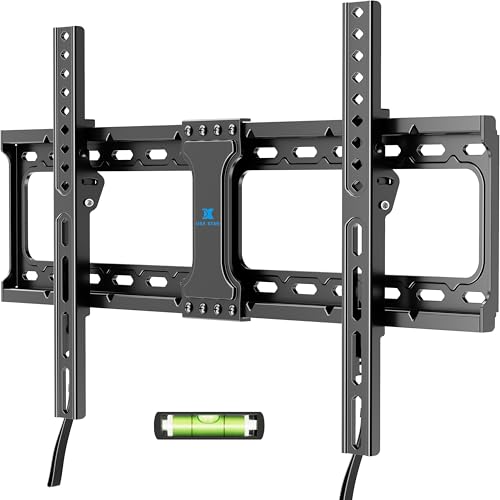
| 2. Wider plate that lists 24 inch studs (USX STAR fixed mount) | A longer slide, plus plate travel on the studs | A new mount | Fix 1 falls short |
| 3. Extension plate (VIVO extension adapter plates) | Depends on the plate | More bolts | Your plate can’t reach two studs |
| 4. Plywood backer | Anywhere on the board | Cut, paint, lag, bolt | Big TVs, odd spacing |
| 5. Long-arm mount (PERLESMITH long-arm full-motion mount) | Limited by the arm’s reach | A new mount, TV off the wall | Studs only to one side |
How do you center a TV on the wall when the studs are off center?
Measure for fix 1 before buying anything. It works on hook-type fixed and tilting mounts, where two vertical rails bolt to the TV and hang on a horizontal wall plate. Check your manual for that arrangement.
- Mark the center you want. Measure the fireplace, bed or sofa, not the wall, and draw a plumb line on painter’s tape. The TV height calculator gives the height of the screen’s center.
- Find the studs on both sides of the line. A Franklin ProSensor M210 stud finder shows the full width of each stud, per its listing, and your target is the middle of that 1.5 inches. Confirm each reading with a thin nail or a small pilot hole before drilling for a lag. On plaster, use the magnet method in our plaster and lath stud guide.
- Measure the gap. The midpoint between the two studs is where a centered plate would sit. Its distance from your line is the gap to close.
- Place the plate. Hold it level and push it toward your line as far as the slots allow, with each stud still showing in a top and a bottom slot. Mark the holes.
- Check the slide before you drill. Bolt the rails to the TV and measure their spread, outside edge to outside edge. The shift each way is roughly the plate width minus that spread, divided by two. A 25-inch plate and a 17-inch spread give (25 - 17) / 2 = 4 inches each way. Both rails must stay fully on the plate.
- Lag the plate, then hang and slide. Use 3/8 x 3 inch lags, two per stud, through 1/4-inch pilot holes in the stud’s center, per our lag bolt and toggle bolt guide. If the mount’s bag has smaller ones, Prime-Line 3/8 x 3 inch hex lag screws are that size. Hook the rails on, slide the TV until the line splits the screen, and secure the locking screws or latches the way the manual shows.
Will the wall plate show if the TV sits off center on it?
Not while the plate stays behind the screen. A 16:9 screen is about 0.87 times its diagonal in width:
| TV size | Screen width, about | Center line to screen edge, about |
|---|---|---|
| 43” | 37.5 in | 18.7 in |
| 50” | 43.6 in | 21.8 in |
| 55” | 47.9 in | 24.0 in |
| 65” | 56.7 in | 28.3 in |
| 75” | 65.4 in | 32.7 in |
| 85” | 74.1 in | 37.0 in |
Measure from your center line to the far end of the plate. If that is smaller than the last column, with an inch or two to spare, nothing shows.
Which TV mounts fit 16, 18 and 24 inch studs?
Fix 2 is a plate with more to give. A plate that lists 24-inch studs has slots reaching at least that far, and on 16-inch framing the spare length becomes travel: up to (24 - 16) / 2 = 4 inches either side of the midpoint if the slots run unbroken. Hold yours over the stud marks to see.
- Fixed: the USX STAR fixed mount lists 16 and 24 inch studs, 37 to 86 inch TVs, VESA up to 600x400 and 132 lb.
- Tilting: the USX MOUNT tilting mount lists 16 and 24 inch studs, 37 to 95 inch TVs and the same 132 lb, for a screen above eye level such as over a fireplace.
- Full-motion: the USX Mount full-motion mount lists 16, 18 or 24 inch studs, dual articulating arms, 42 to 85 inch TVs and 110 lb.
On 24-inch framing a 24-inch plate has no spare slot length, so the rail slide is all you get. If your line falls close to a stud, plan on fix 3 or 4.
The rail spread follows the TV’s VESA pattern, 100 to 400 mm wide on most TVs up to 75 inches and 600 mm or more on most 85s, per our guide to what size TV mount you need. The VESA pattern finder gives your TV’s pattern and weight. Keep the mount’s rating at least 25% above that weight.
What does a TV mount extension plate do?
It puts steel between the studs and a mount that can’t reach them. The VIVO extension adapter plates are sold for this: the title reads “Easy TV Centering for Off-Center Studs” and lists 16 to 24 inch studs and 154 lb. As our plaster wall mount guide puts it, the plate bridges two studs and lets the TV sit centered on the wall instead of centered on the framing.
Use it when the mount you own has too narrow a plate, or when the slide leaves you short. Compare its dimensions with the gap from step 3 before ordering. The lowest rating governs, so a 110 lb mount on a 154 lb plate is still a 110 lb mount.
How do you build a plywood backer for a TV mount?
Fix 4 makes wood appear wherever the mount needs it.
- Cut 3/4-inch plywood smaller than the TV, so the screen hides it, and long enough to cross two studs. Use three for a big TV.
- Paint it the wall color before it goes up.
- Fasten the mount to the board with through-bolts, washers and nuts, or with T-nuts set in from the back before the board goes on the wall. Wood screws into 3/4-inch plywood alone are not enough for a TV.
- Lag the board to the studs, two lags per stud, clear of the mount.
The board changes the lag length. Plywood plus half-inch drywall puts 1.25 inches in front of the stud, so a 3-inch lag keeps about 1.75 inches in the wood and a 4-inch lag about 2.75. On plaster and lath, about an inch thick, a 3-inch lag through a backer falls under the 1.5-inch minimum bite. These 3/8 x 4 inch lag bolts come as eight sets with washers.
Is there a TV mount that slides side to side?
Yes, and you may already own it: hook-type fixed and tilting mounts slide by design. A single-arm full-motion mount is the opposite. Its wall plate is narrow, and folded flat it cannot move sideways at all.
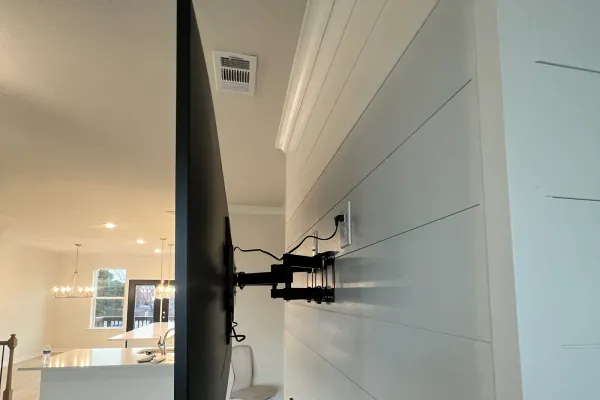
That leaves fix 5, for a wall where the only usable studs are off to one side. A long arm bolted to them can swing the TV out to your center line. The PERLESMITH long-arm full-motion mount lists 42.72 inches of extension, 150 lb, 42 to 90 inch TVs and 16, 18 or 24 inch wood studs.
The TV only reaches center with the arm partly open, so it sits out from the wall. And the arm is a long lever that loads the top lags hardest, so center every lag in its stud and stay well inside the listed weight.
What should you not do when the studs are off center?
- Don’t angle a lag to catch a stud. It crosses only a corner of the wood.
- Don’t lag into the edge of a stud. A 3/8-inch lag centered in a 1.5-inch stud has a bit over half an inch of wood on each side. At the edge, one side has almost none.
- Don’t hang the weight on drywall anchors because the studs are inconvenient. Our do you need studs guide draws the line at a TV of about 32 inches and 30 pounds, on a fixed mount with at least four rated toggles. Past that, and for any full-motion arm, the load goes to studs or a backer board.
- Don’t treat one stud as a shortcut. One stud is only for mounts designed and listed for one stud, with a TV inside that listing’s limits. The same guide’s fallback for a two-stud plate that catches one stud is two lags plus rated toggles in the other holes, on a TV under 75 inches.
- Don’t use lags in steel studs. Thin steel takes toggles through the stud, covered in our metal stud mount guide.
Frequently asked questions
What do I do if the studs are not centered for my TV mount?
Bolt the wall plate to the studs where they are and hang the TV off-center on the plate. Hook-type fixed and tilting mounts let the rails sit anywhere along it.
Can I mount a TV on one stud?
A mount designed and listed for a single stud can, with a TV inside the size and weight on that listing. A two-stud plate should reach two studs, and an extension plate or a plywood backer gets it there.
Will a TV mount work with 24 inch studs?
Yes, if its listing includes 24-inch spacing. The USX Mount full-motion mount lists 16, 18 and 24 inches, and the USX STAR fixed and USX MOUNT tilting mounts list 16 and 24. A 16-inch-only plate catches one stud on 24-inch framing.
How thick should a plywood backer be for a TV mount?
Use 3/4-inch plywood, lagged into at least two studs and three for a big TV. Fasten the mount to it with through-bolts or T-nuts, not wood screws.
Can I use toggle bolts on the side of the mount that misses the stud?
Not to carry the TV. Toggles beside lags that are already in a stud keep the bracket square while the stud does the holding.
Want it installed?
Labor is a flat rate by TV size: $129 up to 54”, $159 for 55-69”, $209 for 70-79”, $299 for 80-94” and $399 for 95” and up, with no surcharge for drywall, plaster or metal studs. Bring your own bracket or buy one of ours for $49 to $79, and every install carries a 3-year workmanship warranty. Rates are on the price list. If the wall may need a backer board, ask for a quote or call (470) 777-4077.